Returned waybills and messages from the office
1 min readWaybillsEN · LV · RU
In short
If the office has a question, it returns the waybill with a message.
You get a notification and the card «The office returned a waybill».
Answer, add a trip if needed, and send the answer.
How you see it
- a notification on the phone;
- a card in Waiting for you on the Today tab;
- the status Returned with a question in My waybills.
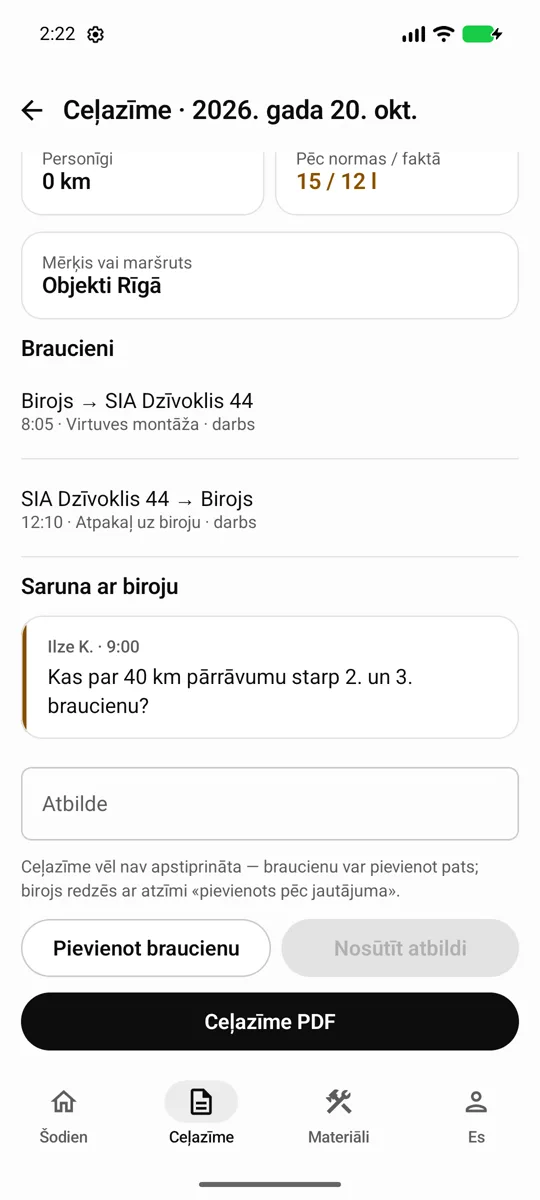
How to answer
Video transcript
- 0:00«Waiting for you»: the office returned a waybill.
- 0:04Read the question and answer it.
- 0:08Statuses and PDFs are in «My waybills».
- Open the waybill. At the top is the Conversation with the office.
- Read the question.
- If you forgot a trip, add it. The office sees it marked «added after the question».
- Write the answer and tap Send answer.
In the cabinet: Vēsture (History) › the returned day › Atbildēt birojam (Answer the office).
Statuses
- Driver: Open → sends → Sent
- Office: Sent → approves → Approved
- Office: Sent → asks → Returned with a question
- Driver: Returned with a question → answers → Sent
Did the article help?